Memperkenalkan AI Agent 🤖💬 Pelajari Lebih Lanjut

FOR CLINICS · HOSPITALS · HEALTHCARE NETWORKS

Clinic enquiries. Clear owners. A shared record.

Bring routine administrative enquiries from WhatsApp, WeChat and LINE into one shared inbox. Organise approved clinic information, assign enquiries and agree when staff take over. Confirm the connections and data-handling requirements for the planned workflow.

Trusted by 10,000+ enterprises across 60+ industries. ISO/IEC 27001 certified. Official Meta Technology Partner.

WhatsAppWeChatInstagram
Appointment-message illustration. A depicted status is not proof of a configured booking or clinic deployment.
Appointment enquiry assigned
Staff verification and next step
Enquiries routed to the team
Multilingual, governed AI
Owner
Agree who answers
Record
Keep verified context
Handoff
Confirm the staff route

Suggested administrative acceptance checks, not performance figures.

Discuss your clinic administration workflow

Tersertifikasi ISO/IEC 27001 Official Meta Technology Partner · official WhatsApp Business Platform 10,000+ enterprises across 60+ industries
WhatsAppWeChatInstagramFacebookLINESMSWebsite widgetIn-app live chat

The healthcare reality

Missed enquiries create extra follow-up and unclear ownership.

Clinic teams need a clear record of administrative enquiries, appointment requests and follow-up responsibilities across their chosen channels.

01

Appointment changes need a clear owner

Choose how staff record appointment changes and confirm the next update. Establish your own baseline before measuring reminders or follow-up.

02

Comms fragmented across phone, SMS and email

Administrative enquiries spread across channels are harder to follow. Keep the verified facts, owner and next step together, and confirm the systems your team uses.

03

Define the AI scope before rollout

Keep the administrative scope clear. Approved clinic information can support routine enquiries; questions requiring medical judgement are handled by qualified clinic staff.

04

The front desk is buried in routine questions

Opening hours, location, service information and appointment logistics are recurring administrative enquiries. Agree which approved information may be used and when staff must respond.

05

After-hours enquiries need a clear staff route

An after-hours administrative enquiry needs an honest availability message and a defined staff handoff. Questions about symptoms are for clinic staff, not an automated medical assessment.

06

Confirm information handling before use

First establish the information, permissions and retention arrangements needed for the administrative task. Confirm available settings and responsibilities before using sensitive information.

One administrative journey to verify

Respond, coordinate and follow up.

Use a shared record for routine administrative enquiries, appointment coordination and staff follow-up. Confirm ownership and each required system connection.

Step 1

Reach & Book

Route first enquiries to the appointment team.

Step 2

Coordinate

Appointment coordination with a clear record.

Step 3

Retain & Protect

Confirm permission-based administrative follow-up.

1 Reach & Book

Route first enquiries to the appointment team.

Start with an administrative enquiry and agree what information is needed. Request a demonstration of the applicable form, appointment request and staff handoff. Confirm the number setup, permissions and integrations before using real information; a messaging connection does not establish an automatic booking workflow.

  • Selected response languages and staffed escalation
  • Demonstrate the permitted administrative fields and applicable form connection
  • Confirm the approved form questions and exception route
  • Route administrative insurance enquiries to authorised staff
  • Agree reminder timing, staff-owned changes and any required calendar connection
  • Collect only permitted administrative information and confirm the data-handling setup.
Reach & Book
In-chat form illustration. Confirm permitted administrative fields and data-handling requirements before use.
2 Coordinate

Appointment coordination with a clear record.

Coordinate appointment logistics, approved administrative information and staff follow-up in a shared conversation. Any portal or call-link workflow needs a confirmed integration and permissions. Medical assessment, treatment instructions and result interpretation remain with qualified clinic staff.
  • Staff-approved administrative preparation and required paperwork
  • Staff-owned follow-up with a clear next step
  • Approved portal or appointment-link handoff, if configured
  • Route appointment follow-up requests to clinic staff
  • Record administrative reminder preferences
  • Medical questions and result interpretation are handled by clinic staff
Coordinate
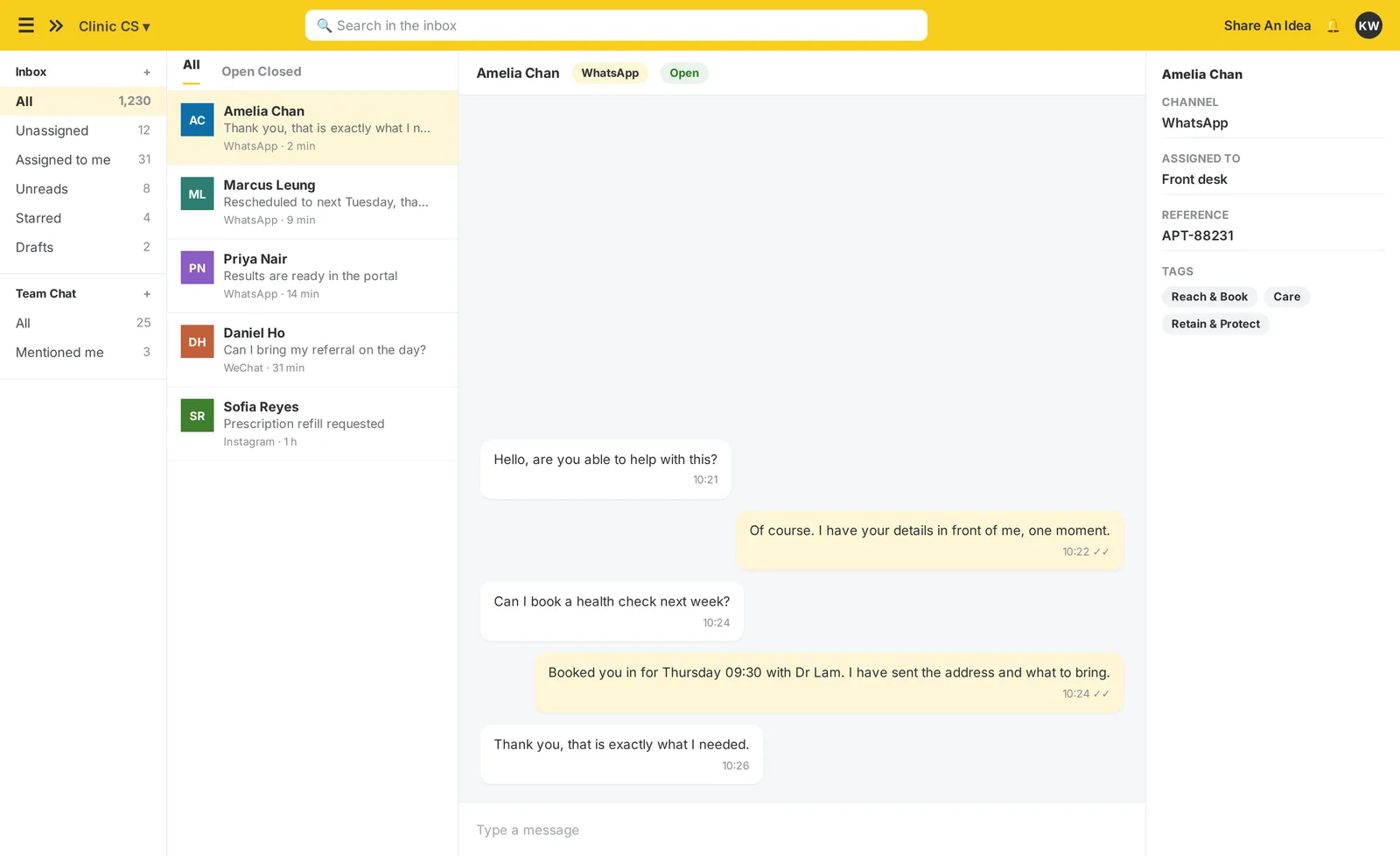
Original published inbox collaboration view. Generic product interface, not medical result handling or a clinic deployment.

Original published product view. Administrative example; not a verified clinic deployment.

View original product image
3 Retain & Protect

Confirm permission-based administrative follow-up.

Use approved administrative notices and permission-based follow-up. Agree the responsible staff, recipient rules, record source and exception process before scheduling messages.
  • Confirm the purpose, permissions and owner for administrative reminders
  • Use only staff-approved service and membership information
  • Ask staff to verify waitlist and cancellation status
  • Confirm the approved billing link and receipt source
  • Agree an administrative feedback question and record owner
  • Confirm recipient permissions and the available record controls
  • Check actual access, masking and retention settings
Retain & Protect
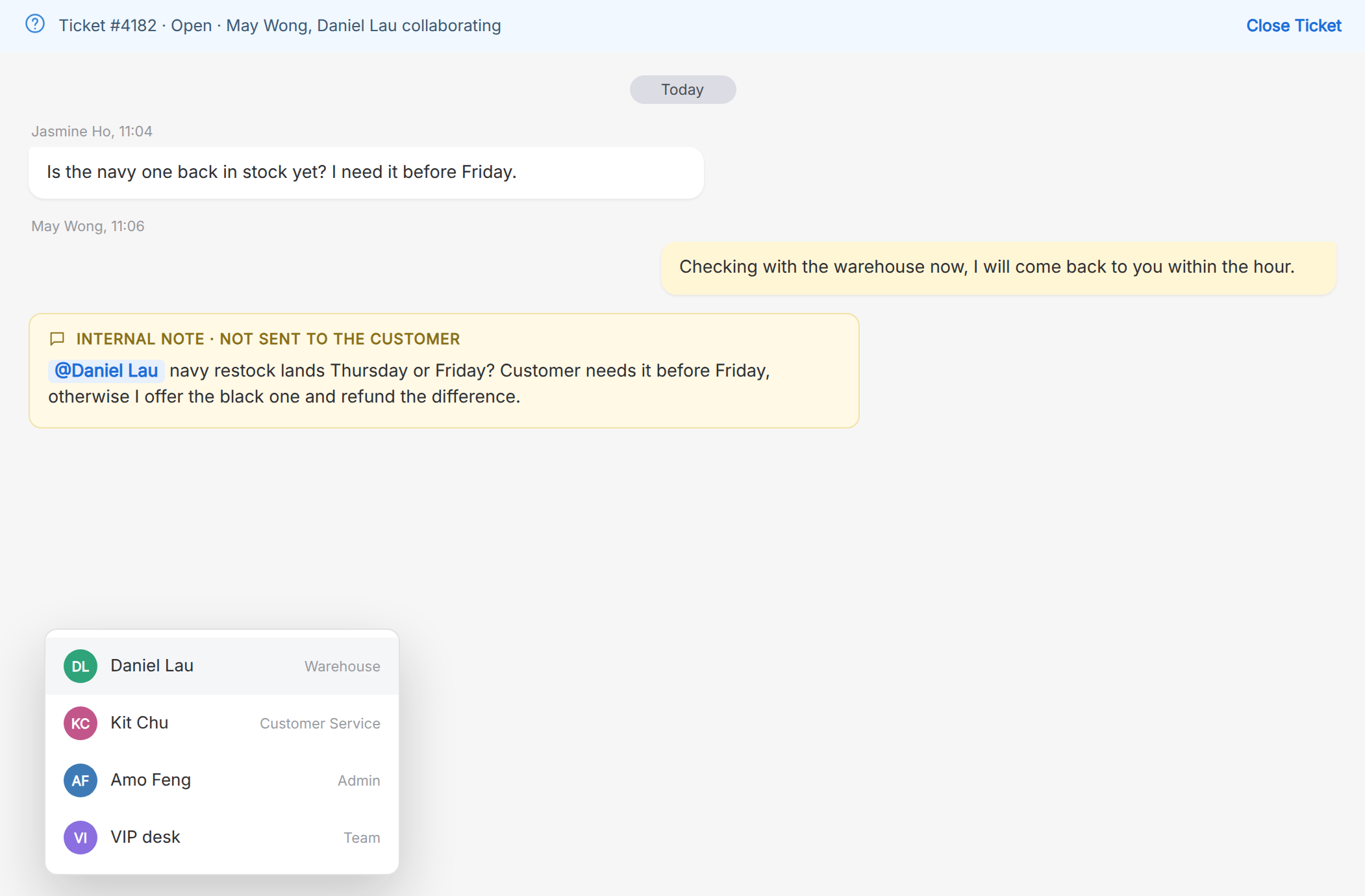
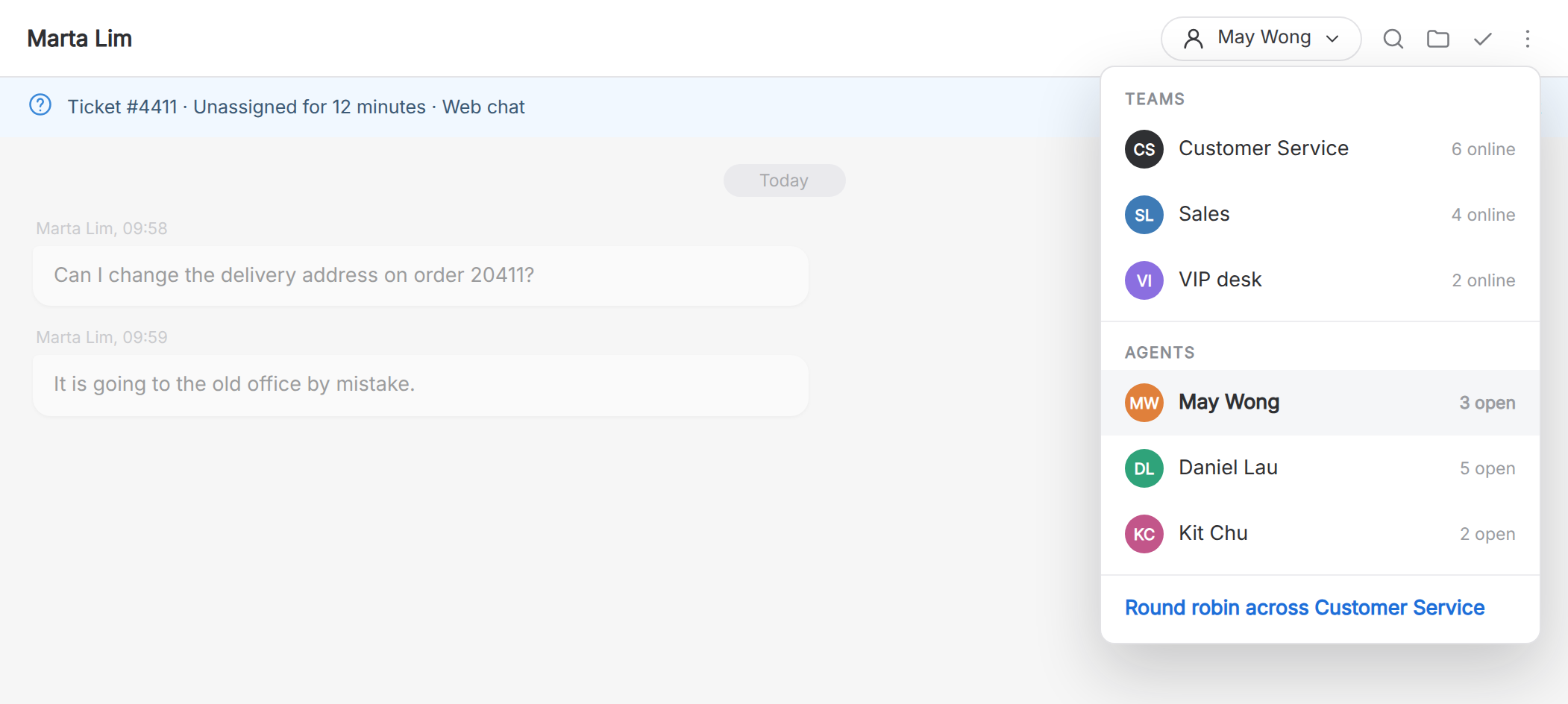
Original published inbox assignment view. Generic product interface, not a validated clinical recall workflow.

Original published product view. Administrative example; not a verified clinic deployment.

View original product image

Where it starts

Every front door lands in the same inbox.

Confirm which enquiry sources connect to the inbox, what source information is available and which staff receive each administrative request.

WhatsAppThe ad opens a chat, not a landing page, carrying its campaign, ad set and ad.
Comment-to-DMConfirm the permitted comment-reply workflow and staff ownership.
Website WidgetA page-targeted greeting on doctor and service pages, shown only when a coordinator is free.
One governed inboxRoute administrative enquiries to the agreed team, with relevant conversation context and a named owner.
A booked appointmentConfirm the calendar connection and ask staff to verify appointment status.
A known patientConfirm the permitted administrative contact record and access across teams.
An attributed sourceCheck which enquiry-source records and reports are available.
The imBee Click-to-WhatsApp Ads view, each ad carrying its campaign and ad set into the conversation, with its conversion flow beside it

Swipe the screen to see the rest.

Click-to-WhatsApp Ads inside imBee. Every ad keeps its campaign, ad set and ad on the conversation it opens, and conversion events go back to Meta, so the spend and the enquiry are the same record.

More use cases

More ways healthcare teams put imBee to work.

These are proposed administrative workflow examples. Confirm the available features, permissions, staff responsibilities and required connections for each example before use.

Book

Approved administrative information

Use approved information for routine administrative enquiries and make staff availability visible. Questions outside that scope go to clinic staff. Test the handoff instead of assuming the morning queue will be empty.

In-Chat BookingHuman HandoverBusiness-Hours RoutingAgen AI

Set a baseline, verify scope and keep actual records.

Book

Appointment-change handoff

Confirm how staff receive and handle appointment-change requests, and verify the status source. Demonstrate exceptions and handoff rather than assuming a live calendar connection or an automatic reschedule.

Scheduled RemindersIn-Chat BookingTemplate ButtonsKotak Masuk Omnichannel

Set a baseline, verify scope and keep actual records.

Book

In-chat booking & intake forms (WhatsApp Form)

Request a demonstration of the applicable administrative form, permitted fields and record location. Confirm account requirements, access, data handling and any export or system connection before use.

WhatsApp Flows FormsIn-Chat BookingHuman HandoverOpt-in Management

Set a baseline, verify scope and keep actual records.

Book

Staff-owned billing enquiry

If a billing enquiry needs a payment link, confirm the approved gateway, integration and staff responsibilities. A message or opened link does not establish that a payment was completed.

Payment LinksIn-Chat BookingKotak Masuk OmnichannelSmart Routing
Book

Visitor information in selected languages

Help visitors find approved clinic information, location details and appointment logistics in selected languages. Medical suitability, history assessment and treatment decisions are handled by clinic staff.

Drip SequencesJourney BuilderMultibahasaKotak Masuk Omnichannel

Set a baseline, verify scope and keep actual records.

Book

Stalled-inquiry revival drips

Agree whether staff should follow up an unanswered administrative enquiry, which approved message may be sent and how a reply is assigned. Confirm consent, timing and exception handling in the demonstrated workflow.

Drip SequencesScheduled RemindersConversation Auto-CloseAgen AI

Set a baseline, verify scope and keep actual records.

Prepare

Administrative preparation information

Send only staff-approved administrative preparation information, such as arrival details and what to bring. Medical preparation, medication changes and treatment instructions remain the responsibility of the clinic’s qualified staff.

Drip SequencesIn-Chat BookingKotak Masuk OmnichannelSmart Routing
Prepare

New-patient onboarding packs

Prepare a clinic welcome pack with approved opening hours, location, contact details and appointment logistics. Confirm the distribution and consent process for the planned workflow.

Opt-in ManagementJourney BuilderMedia & DocumentsKotak Masuk Omnichannel
Notify

Staff-approved administrative notifications

Define which administrative notices staff may send and where the confirmed status comes from. Verify any approved portal-link handoff; this is not AI interpretation or automatic release of medical results.

Proactive NotificationsReporting & AnalyticsMasking, RBAC & AuditKotak Masuk Omnichannel
Notify

Appointment-link coordination

Confirm appointment logistics, reminders and any approved joining link with the responsible staff. Demonstrate each required connection before rollout; clinical consultation and treatment remain outside this example.

Scheduled RemindersIn-Chat BookingKotak Masuk OmnichannelSmart Routing
Follow-up

Repeat-appointment enquiry handoff

Record an administrative request and route it to the responsible clinic staff. Do not use this workflow to decide medication, dosage, refill eligibility or treatment.

Scheduled RemindersJourney BuilderSmart RoutingKotak Masuk Omnichannel
Follow-up

Staff-owned follow-up record

Keep a staff-owned follow-up record and a route to the appropriate team. This is not automated symptom assessment, reassurance, clinical escalation judgement or a decision to close a medical concern.

Human HandoverConversation Auto-CloseSmart RoutingKotak Masuk Omnichannel
Follow-up

Approved clinic-information handoff

Keep the administrative follow-up owner, approved contact information and next step together. Medical guidance, warning-sign assessment and decisions about care are provided by qualified clinic staff.

Kotak Masuk OmnichannelSmart RoutingContact ProfilesMessage Templates
Re-engage

Segmented reactivation outreach

Agree the purpose and permissions for administrative reminders or service information. Confirm the source records, recipient selection and staff responsibilities for each proposed workflow.

Scheduled RemindersTags & SegmentsKotak Masuk OmnichannelSmart Routing

Set a baseline, verify scope and keep actual records.

Re-engage

Staff-approved administrative message sequence

Any administrative message sequence needs a defined purpose, approved information, recipient permissions and a staff owner. This example does not select care or education based on a medical condition.

Journey BuilderTags & SegmentsKotak Masuk OmnichannelSmart Routing

Set a baseline, verify scope and keep actual records.

Re-engage

Review and referral engine

Agree a voluntary administrative feedback process and its owner. Confirm the available workflow before assuming automated invitations; do not promise reviews, referrals or acquisition results.

Broadcast CampaignsOpt-in ManagementSmart RoutingKotak Masuk Omnichannel

Workflow examples on this page are proposed administrative patterns, not imBee customer performance results.

Governed AI

AI support for routine clinic administration.

Organise approved clinic information and administrative instructions. Confirm the agent’s available channels, connections and escalation route for the agreed workflow before deployment.

Use AI for approved administrative questions such as clinic hours and locations. Questions about symptoms, diagnosis, treatment or results go to qualified clinic staff. Define and test that handoff before use.

CantoneseEnglishMandarinWhatsApp · WeChat · LINE
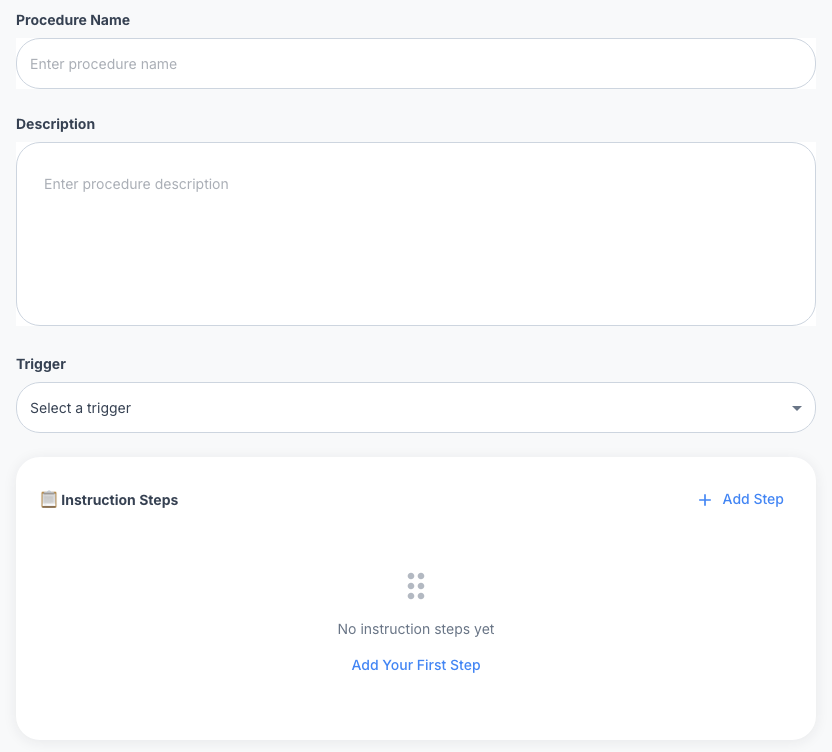
Original published AI Agent procedure configuration. Setup shown, not an executed test or clinic result.

Original published product view. Administrative example; not a verified clinic deployment.

View original product image

How it fits together

Confirm channels, ownership and required connections.

Map the administrative enquiry, approved information, staff handoff and required record source. Demonstrate each proposed connection and control for the actual deployment.

Where customers reach you
WhatsApp
WeChat
Instagram
Facebook
LINE
SMS
Website widget
In-app live chat

imBee

One governed thread, from the first message to the system of record.
Omnichannel InboxEvery conversation and its history in one place, routed to the right team
imBee AIApproved administrative information, tested boundaries and staff handoff
Journeys and automationConfirm each administrative workflow, trigger and record source
GovernanceMasking, role-based access, retention and a full audit trail
Your systems
EHR / EMR: confirm the exact connection
Clinic system: confirm the exact connection
Google Calendar
Tenaga Penjualan
HubSpot
300+ more
Connects withEHR / EMR: confirm the exact connectionClinic system: confirm the exact connectionGoogle CalendarSalesforceHubSpotWebhooks & API300+ more

Platform tersebut

Tools to evaluate for clinic administration.

Explore the messaging and coordination tools needed for an administrative workflow. Confirm plan availability, access and integrations during scoping.

Kotak Masuk Omnichannel

Explore the channels, assignment and shared conversation context available for an administrative workflow. Confirm the required channels, permissions and plan scope for your organisation.

Kampanye & Siaran Pemasaran

Confirm sender and recipient requirements for staff-approved administrative notices. Review the available campaign controls and delivery records for the proposed workflow.

imBee AI, governed intelligence

Configure an agent around approved administrative information, representative tests and a defined staff handoff. This example does not provide medical advice or clinical decision-making.

Chatbot & Otomasi

Request a demonstration of the required administrative workflow and exact system connection. Confirm vendor support, permissions, sync behaviour and who verifies the result before rollout.

Booking & Forms in Chat

Demonstrate the administrative appointment enquiry and required form. Confirm approved fields, staff verification and calendar access before claiming a booking or reschedule is complete.

Tata Kelola Data

Confirm the access, masking, retention and audit settings required for the administrative workflow. Review the actual deployment and data-handling responsibilities before using real records.

The imBee Team Inbox: every channel in one thread, the customer’s profile and history beside the conversation, and assignment and tagging without leaving it

Swipe the screen to see the rest.

One inbox, every channel. WhatsApp, WeChat, Instagram, LINE, SMS and your own app land in the same thread, with the customer’s history beside it and every message logged.

Review the available access, masking, retention and audit controls for the planned administrative workflow. Confirm your organisation’s requirements and configured controls before using real records; the example is not a guarantee of regulatory or hospital-supplier compliance.

The full toolkit

Every capability, in one view.

Available on the imBee platform today. Plan availability is confirmed during scoping.

Inbox and channels

Kotak Masuk OmnichannelMulti-Number ManagementWhatsApp CoexistenceWebsite WidgetIn-App Live Chat SDKComment-to-DMQR Codes & LinksMultibahasaWhatsApp GrupVoice Notes

AI that follows your guidelines

Agen AIAI CopilotRAG Knowledge BaseImage OCRAI Execution TraceHuman Handover

Campaigns and outreach

Broadcast CampaignsWhatsAppDrip SequencesDynamic SegmentsCarousel TemplatesMessage TemplatesTemplate ButtonsDynamic URL ButtonsDelivery & Read ReceiptsFailure Tracking

Automation and routing

Journey BuilderSmart RoutingAuto-AssignmentBusiness-Hours RoutingTicketing & SLAScheduled RemindersProactive NotificationsConversation Auto-CloseBalasan Cepat

Booking, commerce and forms

WhatsApp Flows FormsIn-Chat BookingLive Calendar SyncCatalog in ChatPayment LinksMedia & Documents

Contacts, data and systems

Contact ProfilesTags & SegmentsCustom FieldsBulk Contact ImportOpt-in ManagementCRM SyncIntegrations & APIChat History ExportSnippets & Notes

Governance and insight

Masking, RBAC & AuditSSO & IP AllowlistReporting & AnalyticsCSAT Surveys
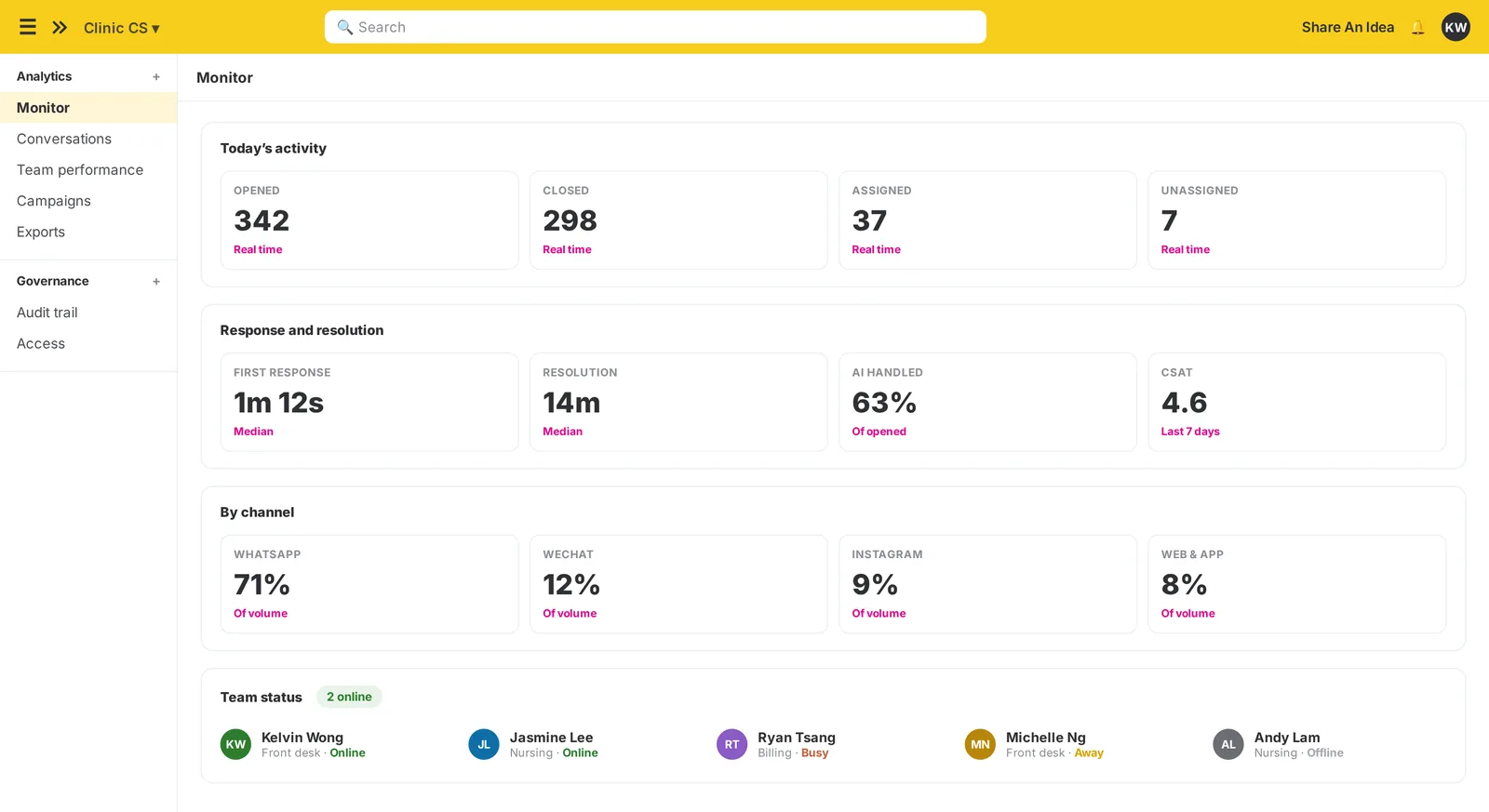
The imBee monitor view: today’s activity, response and resolution times, volume by channel and the status of every team

Swipe the screen to see the rest.

What every team actually did. Response and resolution by team and agent, CSAT after the conversation, role-based access and a full audit trail on every thread.

Before and after

Today, and with imBee.

The same four moments, run the way they run now and the way they run once every clinic shares one governed inbox.

Kemampuan
Today
With imBee
Appointment booking
Phone queue, manual calendar
Staff verify the appointment enquiry and confirmed status
Appointment changes
Chased by phone, empty slots
Agreed reminder timing and staff-owned appointment changes
Administrative notices and follow-up
Calls and portals patients forget
Staff verify the approved notice and link handoff
Patient data
Personal chat apps, no trail
Confirm available access, masking and record controls

Mengapa imBee?

Built for the way patients actually communicate.

Choose channels and response languages from your actual enquiries. Confirm the required account connections, approved content and staffing for the administrative workflow.

1

True omnichannel, incl. WeChat + LINE

Not just Meta channels, meet patients on WhatsApp, WeChat, LINE and Instagram, wherever in the world they message from.

2

Selected languages and staffed handoff

Choose languages from your actual enquiries and staffing. Translation assistance does not establish fluent human coverage or clinical assessment in that language.

3

AI for administrative enquiries

Use approved clinic information and route questions outside the administrative scope to clinic staff.

4

Access and records to confirm

Discuss access, retention, masking and audit requirements for the actual deployment. Confirm the available controls and responsibilities.

5

One record for the agreed administrative workflow

Keep administrative enquiries, appointment coordination and approved follow-up in a shared record, with connections and responsibilities confirmed.

6

Administrative scope and staffed handoff

Use a focused administrative workflow and measure it against your own baseline. Keep staff responsible for exceptions and questions requiring medical judgement.

7

Confirm the required system connection

Confirm the exact clinic or CRM connection, permissions and administrative records your team needs. Do not infer support for a vendor or clinical workflow from a generic integration label.

Questions

Everything you might be wondering.

How should we evaluate a clinic administration workflow?+
Evaluate a defined administrative journey, such as an appointment enquiry or staff handoff. Keep an owner, agreed expectations and actual records. Measure operational changes against your own baseline; this page does not establish clinical outcomes or a guaranteed improvement.
What is the proposed AI scope?+
Use AI for approved administrative questions such as clinic hours and locations. Medical questions are handled by qualified staff. Agree knowledge boundaries, staff handoff, data handling and acceptance tests before use.
Which data and access controls should we confirm?+
Confirm the available access controls, masking, retention and audit settings for your actual workflow and plan. Your organisation must assess its own data-handling requirements and configured deployment. This example does not establish compliance with a law or hospital supplier standard.
Can we demonstrate an administrative form or appointment request?+
Request a demonstration of an approved administrative form or appointment enquiry, collecting only necessary and permitted information. Confirm plan, account and integration requirements; do not assume automatic registration, appointment confirmation or reminders.
How do we confirm our clinic-system integration?+
Confirm the exact vendor, permitted data, access and supported connection during scoping. Ask for a demonstration of the required administrative workflow; generic API or integration descriptions do not prove a configured EHR or clinic-system connection.
How should we measure appointment-change or reminder outcomes?+
No improvement percentage is promised. Agree a reminder or appointment-change process, define the measurement and compare actual records with your own baseline before expanding the workflow.
Which channels and languages should we select?+
Select the channels and response languages your workflow needs. Confirm platform connections, account requirements and staffed escalation; this example does not guarantee every language or channel for every deployment.
What is the scope for appointment or portal links?+
The proposed scope is administrative coordination. Confirm whether your workflow can deliver an approved appointment or portal link and verify each required connection. Medical result interpretation and clinical advice are handled by qualified clinic staff.
What should an appointment demonstration show?+
Follow a fictional appointment enquiry from receipt to the responsible staff and a verified status in the agreed source system. Confirm calendar access, approvals and exception handling; the example does not guarantee an automatic booking.
How are medication-related enquiries handled?+
Medication and prescription requests are handled by the clinic’s authorised staff. This administrative example can identify an enquiry owner and next step; it does not assess symptoms, determine refill eligibility, change medication or provide medical advice.
How should billing messages and payment links be scoped?+
Discuss administrative billing notices and any planned payment link. Confirm the gateway integration, status source and permissions. A message or opened link is not payment confirmation.
How should we review administrative feedback?+
Define the administrative feedback question, recipient permissions, review owner and result record. Confirm the available feature and integration before assuming an automatic survey or system sync.
What should a cancellation or waitlist demonstration show?+
Demonstrate a cancellation enquiry and staff handoff using a fictional appointment. Staff verify availability, recipient permissions and the next offer in the actual calendar or agreed source before it is sent.
How should we scope routine enquiries and staff handoff?+
Use approved information for routine administrative enquiries and make service hours and staff handoff clear. Verify the workflow before using it with patients. It does not provide autonomous clinical replies or a guaranteed reduction in phone demand.
How is onboarding scoped?+
Onboarding depends on your channels, team access, account readiness and required integrations. Our team confirms the implementation steps, plan scope and applicable usage charges for your organisation. Bring one workflow to the demo so responsibilities and acceptance checks can be agreed before rollout.

Ready when you are

A clinic workflow your team can verify.

Bring one administrative enquiry, the information your team approves and the handoff that needs a person. Confirm the actual scope in a demonstration.